
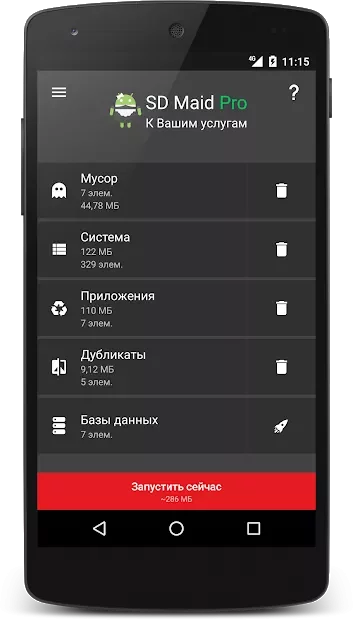
SD Maid Pro 5.6.2
DownloadApp details
- Updated
- 22.06.2025
- Category
- Miscellaneous
SD Maid Pro 5.6.2 is a powerful utility designed specifically for Android devices to help you find and remove unnecessary files and applications from your device's memory. This app offers a wide range of features that allow you to clean up your system efficiently, ensuring that your device runs smoothly and efficiently. One of the key features of SD Maid Pro is its ability to scan the file system for additional data, whether it's leftover files from uninstalled apps or cached data from applications.
This helps in freeing up valuable storage space on your device, which can be crucial for maintaining optimal performance. The app also provides a detailed view of all the files and folders on your device, allowing you to easily identify and delete unnecessary items. With its user-friendly interface, you can quickly navigate through your device's storage and manage your files with ease.
SD Maid Pro 5.6.2 is an essential tool for anyone who wants to keep their Android device in top condition. By regularly using this app, you can ensure that your device remains fast and responsive, providing a better user experience overall.
How to install the app
- Check the version, Android compatibility, developer and source in the app details block.
- Open the Downloads tab and use the official source or an available catalog link.
- Before installing, review app permissions and use only sources you trust.
Frequently asked questions
What is SD Maid Pro 5.6.2?
SD Maid Pro 5.6.2 is an Android utility app designed to find and remove unnecessary files and applications from your device's memory.
How does SD Maid Pro help with storage?
It scans the file system for leftover files from uninstalled apps and cached data, helping to free up valuable storage space.
Is SD Maid Pro easy to use?
Yes, it has a user-friendly interface that allows you to easily navigate and manage your device's storage.
Similar apps







No comments yet. Be the first!