

SpaceX - Dual App & Clone
DownloadApp details
- Version
- 1.0.2.9
- Updated
- 29.09.2026
- Category
- Tools
- Compatibility
- Android
- Package name
com.momoerica.cloner.gp- Source
- Official Google Play page
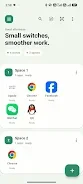
SpaceX - Dual App & Clone is a revolutionary application designed to enhance your Android experience by allowing you to run two accounts of the same app on a single device. This means you can seamlessly switch between personal and work accounts without the hassle of logging out or needing a second phone. The app creates isolated spaces on your Android device, ensuring that your work and personal life remain confidential and easily accessible whenever you need them.
Why choose SpaceX? Most smartphones are built for single-account use, but SpaceX breaks this limitation. Whether you need two WeChat accounts, two WhatsApp numbers, or a separate browser for work alongside your personal one, SpaceX makes it instant and easy.
The process is simple: create a space, clone the necessary apps within that space, and switch between them with just one touch. Each space operates independently, meaning apps in one space cannot see those in another. Your data, logins, and notifications are fully isolated, ensuring your privacy.
Key features include the ability to clone any app, multiple spaces for organizing your digital life, one-touch switching, complete isolation for each space, and lightweight performance without draining your battery. SpaceX is perfect for anyone with dual phone numbers on one device, those who need to separate work and personal accounts, social media managers, travelers using local SIM cards alongside their home accounts, gamers juggling multiple profiles, and businesspeople managing separate client accounts. With compatibility across most Android applications, including messaging, social media, browsers, shopping, travel, and gaming, SpaceX offers a smarter way to manage your accounts and leave the hassle of multiple devices behind.
How to install the app
- Check the version, Android compatibility, developer and source in the app details block.
- Open the Downloads tab and use the official source or an available catalog link.
- Before installing, review app permissions and use only sources you trust.
Frequently asked questions
What is SpaceX - Dual App & Clone?
It's an app that allows you to run multiple accounts of the same application on your Android device.
How does SpaceX work?
You create isolated spaces for different accounts, clone the necessary apps, and switch between them easily.
Is my data safe with SpaceX?
Yes, each space is independent and fully isolates your data, logins, and notifications.
Which apps can I clone with SpaceX?
You can clone various apps like WeChat, WhatsApp, Facebook, Instagram, and more.
Similar apps








No comments yet. Be the first!