
TeamDial Setup
DownloadTeamDial Setup is a specialized companion application designed to help you personalize the watch face of your Wear OS smartwatch. It allows you to configure your digital dial using team colors and styles inspired by various sports games. This tool is perfect for fans who want their smartwatch to reflect their team spirit on game days and every day of the year.
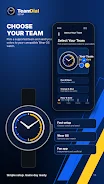
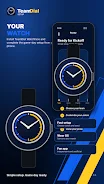
With TeamDial Setup, you can browse through a selection of available watch face styles that are inspired by different teams. The app provides a preview feature, allowing you to see exactly how your chosen design will look on your device before you commit to it. Once you have selected your preferred style, you can easily send your choice to the TeamDial watch face.
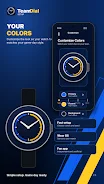
The application is built with simplicity in mind, ensuring that you do not need to dig through complex settings to customize your device. You can adjust your watch with bright team colors and a clean, neutral sports design. The setup process is straightforward, making it accessible for users of all technical levels who want a personalized experience.
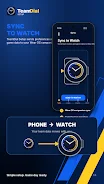
To use this app effectively, you need a compatible Wear OS device and the TeamDial watch face installed. TeamDial Setup acts as a configuration tool, syncing your preferences with the main watch face. It does not replace the watch face but enhances it by providing easy access to customization options directly from your Android phone.
It is important to note that TeamDial is created for fans and is not affiliated with any school, conference, sports association, league, or team. The team names, colors, and related links are used solely to help users personalize their watch experience. This ensures that the app remains a versatile tool for any sports enthusiast, regardless of their favorite team.
Similar apps



No comments yet. Be the first!
Leave a comment