

WPS Office - Word, Docs, PDF, Note, Slide
DownloadApp details
- Version
- 26.9.1 (1633)
- Updated
- 01.12.2021
- Category
- Browsers
- Package name
cn.wps.moffice_eng- Developer
- WPS SOFTWARE PTE. LTD.
- Source
- Official Google Play page
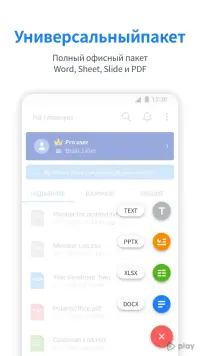
WPS Office is a powerful and versatile application designed to provide a seamless experience for interacting with documents on your mobile device. It serves as a comprehensive solution for users who need to create, edit, and manage files efficiently without being tied to a desktop environment. The software is fully compatible with the most popular document formats, ensuring that you can access your data with ease.
Whether you are working on reports, presentations, or simple notes, this app offers the tools necessary to get the job done effectively. The application supports a wide range of file types, including those with printed information, making it an ideal companion for both students and professionals. While not every file type is editable, the app allows you to view and read documents in their original format without any loss of quality.
This feature is particularly useful when you need to review contracts, academic papers, or business proposals on the go. The compatibility ensures that your documents look exactly as intended, preserving fonts, images, and layout structures. WPS Office closely mirrors the functionality of the desktop version, providing a familiar interface that reduces the learning curve.
You can format paragraphs, apply various styles, and use headers to organize your content logically.
How to install the app
- Check the version, Android compatibility, developer and source in the app details block.
- Open the Downloads tab and use the official source or an available catalog link.
- Before installing, review app permissions and use only sources you trust.
Frequently asked questions
What file formats does WPS Office support on Android?
The application is fully compatible with the most popular document formats, including those with printed information, ensuring broad accessibility.
Can I edit all files in WPS Office?
Not every file type is editable, but you can view and read documents in their original format without any loss of quality or layout structure.
Does WPS Office support wireless printing?
Yes, users have the ability to print any document using wireless printing technology directly from their mobile device for quick physical copies.
Is the mobile version similar to the desktop version?
The application practically does not differ from the desktop version, offering similar formatting, styling, and image insertion tools for a consistent experience.


Version history
Below are the catalog pages found for this app. When a source changelog is available, it will be added separately.
No comments yet. Be the first!