

Brain Alarm - Alarm Clock
Open in Google PlayApp details
- Version
- 1.0.1
- Updated
- 19.09.2026
- Category
- Tools
- Compatibility
- Android
- Package name
com.randomizeteam.brainalarm- Source
- Official Google Play page
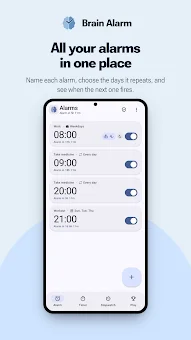
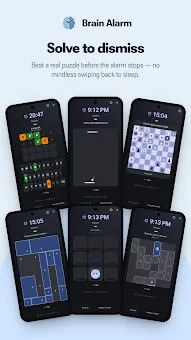
Brain Alarm is the ultimate alarm clock application designed to wake not just your body, but your mind. Traditional alarms are easily dismissed in a groggy state, allowing you to drift back to sleep. This app solves that problem by requiring you to solve a puzzle before the sound stops.
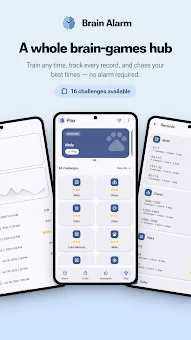
This forces your brain to activate and guarantees that you are truly awake when the alarm concludes. The application offers 16 unique wake-up modes, each with adjustable difficulty levels ranging from gentle to demanding. Challenges include timed arithmetic, color memory sequences, card matching games, chess logic puzzles, word guessing, reaction tests, grid differentiation, clock reading, tennis, piece movement, tile puzzles, color identification, and switch logic.
You can customize the difficulty of each mode to find the perfect level of challenge for your morning routine. For those who tend to fall back asleep after solving a task, a presence check function is included. The app will quietly ask if you are still awake a few minutes later.
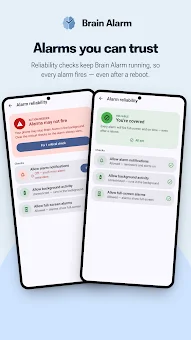
If you ignore this confirmation, the alarm will trigger again. Technical reliability is a key feature, as alarms are registered as system events in Android, ensuring they work even after a phone reboot. Brain Alarm works correctly in deep sleep mode, even when other apps are suspended.
It is compatible with various manufacturers like Samsung, Xiaomi, OPPO, vivo, Huawei, ASUS, and Meizu, helping you locate specific battery optimization settings.
How to install the app
- Check the version, Android compatibility, developer and source in the app details block.
- Open the official app page on Google Play if a link is available.
- Before installing, review app permissions and use only sources you trust.
Frequently asked questions
Does Brain Alarm work in deep sleep mode?
Yes, Brain Alarm is registered as a system event in Android, ensuring it triggers correctly even during deep sleep or after a reboot.
Does the app collect user data?
No, Brain Alarm guarantees privacy by collecting no data, having no accounts, ads, or trackers, and storing all information locally.
What devices is the app compatible with?
The app is optimized for various manufacturers including Samsung, Xiaomi, OPPO, vivo, Huawei, ASUS, and Meizu with specific battery settings.
Can I use custom audio files for alarms?
Yes, you can select any ringtone or custom audio file and set a gradual volume increase for a smoother waking experience.






No comments yet. Be the first!