
Floating Apps (multitasking) 4.14
DownloadApp details
- Updated
- 14.06.2025
- Category
- Miscellaneous
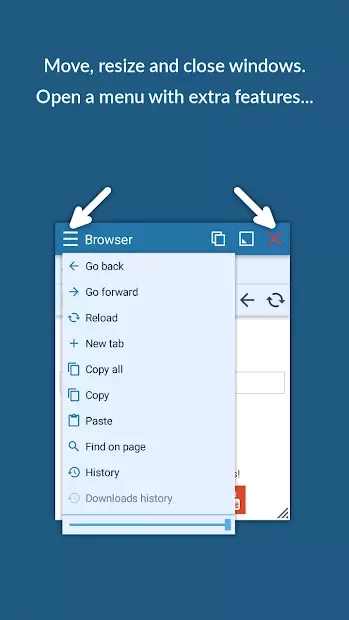
Floating Apps (multitasking) 4.14 is a powerful Android application designed for users who demand seamless multitasking capabilities on their mobile devices. This utility allows you to create floating windows for any installed application, effectively transforming your screen into a dynamic workspace. By enabling multiple apps to run simultaneously in overlay mode, you can significantly boost your productivity and efficiency without switching between different interfaces.
With this APK, you can enjoy a versatile experience where you can watch a movie while chatting with friends in a messenger app, all within the same view. The floating windows are highly customizable, allowing you to adjust their size, position, and opacity to suit your preferences. This feature is particularly useful for gamers who want to keep a guide or chat window open while playing, or for professionals who need to reference documents while working on another task.
The interface is intuitive and easy to navigate, ensuring that even users who are not tech-savvy can set up their floating windows quickly. You can pin the windows to keep them on top of other apps, ensuring that critical information is always visible.
How to install the app
- Check the version, Android compatibility, developer and source in the app details block.
- Open the Downloads tab and use the official source or an available catalog link.
- Before installing, review app permissions and use only sources you trust.
Frequently asked questions
What is Floating Apps (multitasking) 4.14?
It is an Android app that allows users to create floating windows for any installed application, enabling multitasking by running multiple apps simultaneously.
Can I watch a video and chat at the same time?
Yes, you can create a floating window for a messenger app while watching a video in another app, allowing you to do both simultaneously.
Is the app resource-intensive?
The app is optimized for performance to minimize battery drain and resource usage, ensuring smooth operation on most Android devices.
How do I install this APK?
Download the APK file, enable installation from unknown sources in your Android settings, and then open the file to install the application.


No comments yet. Be the first!