
Link Messenger
DownloadApp details
- Version
- 7.4.4
- Updated
- 19.09.2026
- Compatibility
- Android 5.0+
- Package name
org.linkmessenger.me- Source
- Official Google Play page
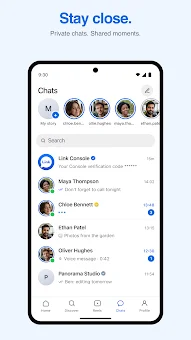
Stay close with Link Messenger, the all-in-one Android app designed to bring your everyday conversations, voice and video calls, stories, and short videos into a single, seamless experience. This versatile application allows you to chat one-to-one or bring people together in group chats, making it easy to share photos, videos, voice messages, and files from quick updates to the moments you want to keep. Whether you are coordinating with friends or managing family groups, Link Messenger keeps everyone connected with reliable messaging tools.
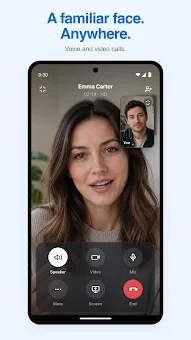
Experience crystal-clear communication with high-quality voice and video calls over your internet connection. Hear a familiar voice or talk face-to-face regardless of where life takes you. The app supports seamless connectivity, ensuring that you stay in touch with loved ones and colleagues without interruption.
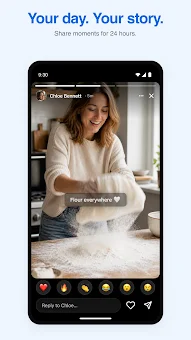
With an intuitive interface, making calls is as simple as tapping a button, providing a natural and fluid interaction that mimics real-life conversations. Express your daily moments with Stories that disappear after 24 hours. Share a photo, video, or text story and choose who can see it.
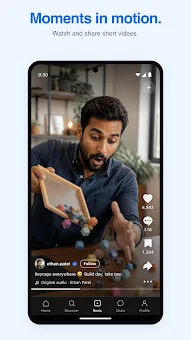
React to friends' stories and keep the conversation going in a dynamic way. Additionally, watch and share short videos, publish photos and posts, and discover something new.
How to install the app
- Check the version, Android compatibility, developer and source in the app details block.
- Open the Downloads tab and use the official source or an available catalog link.
- Before installing, review app permissions and use only sources you trust.
Frequently asked questions
Is Link Messenger free to use on Android?
Yes, the core messaging and calling features of Link Messenger are completely free to use on Android devices, with optional premium upgrades available.
Does Link Messenger use end-to-end encryption?
Yes, private chats and calls in Link Messenger use end-to-end encryption to ensure your conversations remain secure and private from prying eyes.
Can I use Link Messenger on desktop computers?
Absolutely. In addition to the Android app, you can use Link Messenger on your desktop by downloading the dedicated apps for Windows and Mac.
What happens to my stories after 24 hours?
Stories shared in Link Messenger disappear after 24 hours, allowing you to share daily moments without cluttering your profile or chat history permanently.
Similar apps



No comments yet. Be the first!