
MotionCut AI - Video Editor
DownloadApp details
- Version
- 0.1.4
- Updated
- 24.10.2026
- Category
- Multimedia
- Compatibility
- Android
- Package name
com.motioncut- Source
- Official Google Play page
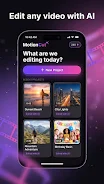
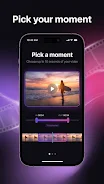
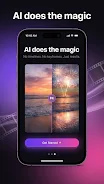
MotionCut AI - Video Editor is an innovative video editor that leverages artificial intelligence to add cinematic visual effects to your existing footage. This Android app transforms the editing process by allowing you to upload a clip and simply describe your desired style, letting the AI handle the heavy lifting without the need for complex timelines, keyframes, or manual adjustments. It is designed for users who want professional results with minimal effort, making it accessible for both beginners and experienced creators.
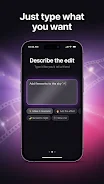
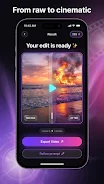
The core functionality of MotionCut revolves around natural language processing for video editing. You can apply cinematic color grading and stylized looks just by typing a text prompt. Whether you want a vintage look, a dreamy slow-motion effect, or a specific blue-orange gradient, the AI interprets your description and applies the visual effects automatically.
This feature turns everyday clips into publication-ready videos in seconds, streamlining the workflow for social media content creation. MotionCut is particularly useful for creators who want to produce high-quality video effects without the learning curve of traditional editing software. It is optimized for mobile devices, featuring a clean and modern interface that works seamlessly on smartphones.
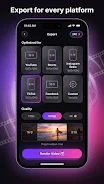
You can edit on the go, making it perfect for generating content for platforms like YouTube Shorts, Instagram Reels, and TikTok.
How to install the app
- Check the version, Android compatibility, developer and source in the app details block.
- Open the Downloads tab and use the official source or an available catalog link.
- Before installing, review app permissions and use only sources you trust.
Frequently asked questions
How does MotionCut AI edit videos?
MotionCut AI edits videos by using artificial intelligence to apply visual effects and color grading based on your text descriptions, eliminating the need for manual timeline editing.
Is MotionCut AI free to use?
The app is free to download, but it uses a credit system for AI editing features. Credits are available as in-app purchases, so you pay only for the edits you create.
What types of effects can I add with MotionCut?
You can add cinematic color grades, stylized looks, vintage effects, and dreamy slow-motion transitions by simply describing the desired style in a text prompt.
Is MotionCut suitable for social media content?
Yes, MotionCut is ideal for creating content for platforms like TikTok, Instagram Reels, and YouTube Shorts, allowing you to quickly produce professional-looking clips.
Similar apps




No comments yet. Be the first!