
PDF Read: Edit & Convert
Open in Google PlaySpaceAPK does not provide APK files. A listed Google Play link is a reference: check the store for availability, version, price and paid features. The catalog version is not offered as a downloadable file.
App details
- Recorded version
- 1.1.0
- Updated
- 14.07.2026
- Category
- Tools
- Compatibility
- Android
- Package name
com.pdfall.readeditconvert.pdffile- Source
- Google Play reference
PDF Read: Edit & Convert is a versatile Android application that seamlessly blends powerful PDF editing capabilities with an intuitive app launcher. This dual-purpose tool is designed for users who want to manage their documents efficiently while keeping their home screen organized and personalized. It serves as an essential companion for students, professionals, and educators who frequently handle PDF files and seek to optimize their digital workspace.
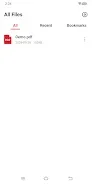
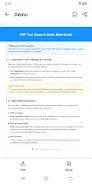
The application offers a smooth and clean interface for reading and viewing documents. You can easily open PDF files and navigate through pages with ease. A standout feature is the customizable text highlighting, allowing you to choose specific colors for emphasizing key points.
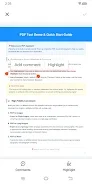
This helps in structuring documents clearly and makes important content stand out at a glance, enhancing your reading and study efficiency. Collaboration and note-taking are simplified with flexible PDF commenting tools. You can highlight specific sentences or paragraphs to add personal notes, which is perfect for organizing thoughts or sharing ideas with colleagues and classmates.
Additionally, the app supports converting PDFs into various formats, including individual images, long continuous images, or editable Word documents, ensuring your documents are accessible in the format you need. Beyond document management, the app functions as a practical launcher.
Availability and source
- Check the version, Android compatibility, developer and source in the app details block.
- Open the official app page on Google Play if a link is available.
- Before installing, review app permissions and use only sources you trust.
Frequently asked questions
Can I convert PDF files to Word documents?
Yes, the app supports converting PDFs into Word documents, as well as into individual or long images.
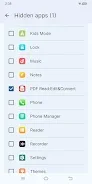
Does the app allow hiding applications?
Yes, you can hide apps for privacy by long-pressing the icon and enabling the hide feature in settings.
Is text highlighting customizable?
Yes, you can choose specific colors for highlighting text to emphasize key points in your documents.
Similar apps
No comments yet. Be the first!