

Samsung Notes
Open in Google PlayApp details
- Updated
- 23.09.2025
- Category
- Tools
- Compatibility
- ANDROID
- Package name
com.samsung.android.app.notes- Developer
- Samsung Electronics Co., Ltd.
- Source
- Official Google Play page
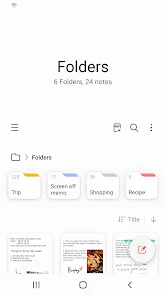
Samsung Notes is a powerful and versatile application designed for creating, editing, and organizing notes on smartphones, tablets, and computers. It offers deep integration with the Samsung ecosystem and supports collaborative work with other users. The app allows you to create documents in various formats, adding images, audio recordings, and text blocks, making the note-taking process flexible and efficient.
Key features include the ability to create handwritten notes using the S Pen or your finger, allowing you to quickly capture ideas by hand. You can add photographs, take snapshots of documents via the camera, and edit them directly within the text. For audio memory, there is a voice recording tool that integrates with the text part of the note.
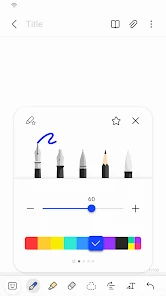
A wide selection of writing tools is available, including pens, pencils, markers, fountain pens with different colors and line thicknesses, as well as an eraser for removing unnecessary elements. A special feature is the work with PDF files: you can add annotations to documents using the S Pen and combine notes with Microsoft Word and PowerPoint files. Data protection is implemented through the Lock Note function, where you can set a password or biometric access for individual notes.
Data import is carried out via Smart Switch or synchronization with the Samsung Account, allowing you to transfer notes from old devices or apps like S Note and Memo.
How to install the app
- Check the version, Android compatibility, developer and source in the app details block.
- Open the official app page on Google Play if a link is available.
- Before installing, review app permissions and use only sources you trust.
Frequently asked questions
How do I create handwritten notes on Samsung Notes?
You can create handwritten notes using the S Pen or your finger, allowing you to quickly capture ideas by hand without typing.
Can I edit PDF files in Samsung Notes?
Yes, you can add annotations to PDF documents using the S Pen and combine notes with Microsoft Word and PowerPoint files.
How do I sync notes between devices?
Data is imported via Smart Switch or synchronization with the Samsung Account, allowing you to transfer notes from old devices or apps.
Is there voice recording in Samsung Notes?
Yes, there is a voice recording tool that integrates with the text part of the note for better audio memory and reference.
Similar apps







No comments yet. Be the first!