
Screen Recorder Video Recorder
DownloadApp details
- Updated
- 24.10.2026
- Category
- Tools
- Compatibility
- ANDROID
- Package name
recorder.screenrecorder.videoeditor- Developer
- Video Player & Cast to TV
- Source
- Official Google Play page
Unlock the full potential of your Android device with Screen Recorder Video Recorder, also known as Recordify. This universal application transforms your smartphone into a powerful video studio, allowing you to capture high-quality screen content and edit it seamlessly. Whether you are creating engaging tutorials, recording intense gaming sessions, or saving important video calls, this tool provides the flexibility and quality needed for professional-looking results.
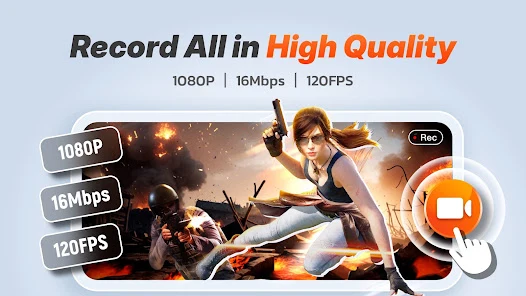
The app is designed to be intuitive, ensuring that even beginners can produce polished videos with minimal effort. Experience crystal-clear recording with support for 1080P resolution and frame rates up to 120 fps on compatible devices. You have full control over audio sources, allowing you to record system sound, microphone input, or both simultaneously.
This versatility makes it ideal for diverse content creation needs. Additionally, the app includes a built-in video editor that lets you trim, rotate, and crop your footage without needing external software, saving you time and storage space on your device. Enhance your videos with advanced features like the Facecam window, which allows you to record your face and commentary in a small overlay.
Use the drawing tool to annotate the screen in real-time, highlighting important details for your audience. You can also convert favorite video moments into smooth GIF animations, perfect for sharing on social media.
How to install the app
- Check the version, Android compatibility, developer and source in the app details block.
- Open the Downloads tab and use the official source or an available catalog link.
- Before installing, review app permissions and use only sources you trust.
Frequently asked questions
What video resolution and frame rate does the app support?
The app supports high-quality recording up to 1080P resolution with frame rates reaching up to 120 frames per second on compatible Android devices.
Can I record both system audio and microphone sound?
Yes, you can record system audio, microphone input, or both simultaneously, providing flexibility for various types of content creation and gaming videos.
Does the app add a watermark to recorded videos?
No, the app does not add a watermark to your recorded videos, ensuring a clean and professional appearance for your content without any distracting logos.
Is there a time limit for screen recordings?
There is no strict time limit for recordings; the duration depends on your device's available storage space and technical capabilities, allowing for long sessions.
Similar apps



No comments yet. Be the first!